Free geometry drawing tool
Draw Geometric Shapes Online
GeometryKit is a free geometry drawing tool that runs in your browser: draw points, segments, lines, circles and polygons by exact length and angle, add perpendiculars, midpoints, tick marks, angle arcs and labels, then export a high-resolution PNG or SVG for worksheets, tests and slides. No sign-up, and diagrams in worksheets you sell are fine.
- Free, no sign-up
- Exact lengths & angles
- Question + answer key
- Re-open exported images
- PNG · SVG · copy
PNG size & background
The PNG stores its print size, so Word and Google Docs insert it at about 8 cm wide. Every PNG and SVG also contains the project, so you can drop it back into the Geometry Editor to keep editing.
How to draw geometric shapes online
The editor works like a ruler, compass and protractor in one. Every construction stays connected, so dragging a point updates everything built from it.
- 1
Place points and draw
Pick the Point, Segment, Line, Ray, Circle or Polygon tool and click on the canvas. Points snap to the grid and to existing lines.
- 2
Use exact lengths and angles
Open Construct by measurement to add a segment of a given length and direction, a triangle from SSS, SAS or ASA, an angle of any size, a regular polygon or a circle with a set radius.
- 3
Add constructions
Draw perpendicular and parallel lines, midpoints and intersections. They stay attached when you move the original points.
- 4
Label and mark
Select any object to rename points, show lengths and angles, add equal-length ticks, angle arcs and right-angle boxes, or make lines dashed.
- 5
Make question and answer versions
Set objects to Answer key only or Question only, then switch the view to export each version from the same drawing.
- 6
Export or save
Download a print-sized PNG or an SVG, copy the image into Google Docs, Slides or Word, or save the project file to keep editing later.
What you can draw
- Basic objects: points, segments, lines, rays, circles, polygons and text.
- Measured constructions: segments by length and angle, triangles from SSS, SAS, ASA, AAS, SSA or right-triangle values, angles of any size, regular polygons and circles with a given radius.
- Geometric constructions: perpendicular lines, parallel lines, midpoints, intersections of lines and circles, and points that slide along a line or circle.
- Worksheet marks: equal-length tick marks, single, double and triple angle arcs, right-angle boxes, arrows, and lengths or angles shown as numbers or as letters such as x and θ.
- Styles: solid, dashed and dotted lines, three thicknesses, colours, shading, and three figure styles: Classic, Modern and Exam paper.
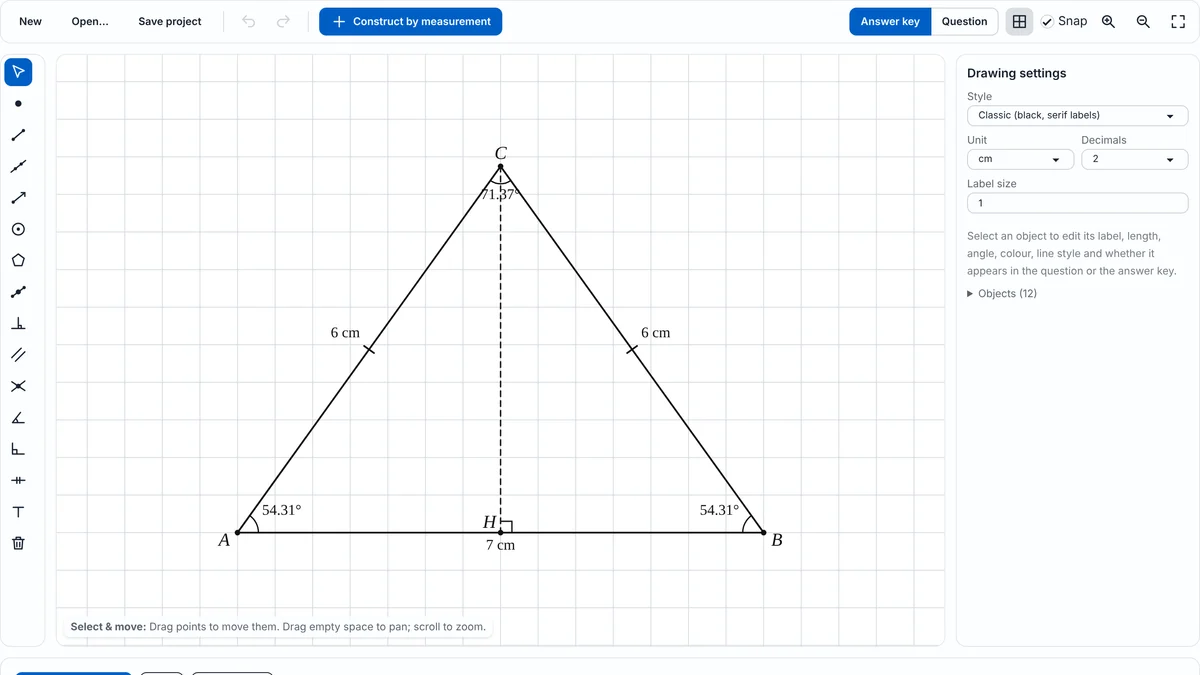
One diagram, two versions: question and answer key
Every object can appear in both versions, only in the answer key, or only in the question. Put the measurement students must find (say, an angle value) in the answer key, and a placeholder such as “x” in the question. Switch between Question and Answer key above the canvas and export each one. Because both come from the same drawing, they always match.
The Triangle Maker, Angle Maker and Polygon Maker build both versions automatically when you hide values.
Save your work and re-open it later
Save project downloads a small .geometrykit.json file you can open again any time with Open… or by dropping it on the canvas. Your latest drawing is also kept in this browser automatically.
Even better: every PNG and SVG you export contains the full project inside the image file. If all you kept is the picture in your worksheet folder, open that PNG or SVG in the editor and keep editing exactly where you left off.
Export to Google Docs, Slides and Word
Copy and paste
Click Copy image and paste with Ctrl+V (⌘V on a Mac) into Google Docs, Google Slides, Word, PowerPoint, OneNote or Canva.
PNG or SVG?
| Format | Best for | Notes |
|---|---|---|
| PNG | Google Docs and Slides, Word, LMS uploads, printing | Saved at 150, 300 or 600 dpi with its print size, so it lands at the width you chose (8 cm by default) |
| SVG | Word, PowerPoint, Keynote, Canva, Illustrator, Inkscape, websites | Vector: stays perfectly sharp at any size. Google Docs does not accept SVG, so use PNG there |
| Project file | Editing later | Re-open in GeometryKit; PNG and SVG exports contain it too |
Who uses GeometryKit
Teachers making tests and handouts
Draw clean, consistently labeled figures for quizzes, homework and slides in minutes, with the question and answer key from one drawing. The Exam paper style uses thin black lines and serif italic point labels, the way printed test papers look.
Worksheet sellers
Diagrams you create with GeometryKit may be used in products you sell, such as worksheets on Teachers Pay Teachers, with no attribution required. See the terms for details.
Tutors and students
Sketch a problem exactly to scale, check a construction, or measure an angle and a length straight from the drawing.
GeometryKit compared with dynamic geometry apps
Apps such as GeoGebra and Desmos Geometry are powerful dynamic-math suites for exploring and teaching. GeometryKit focuses on one job: producing clean, print-ready figures quickly.
| GeometryKit | Dynamic geometry suites (GeoGebra, Desmos) | |
|---|---|---|
| Main purpose | Diagrams for worksheets, tests and slides | Interactive exploration, graphing and lessons |
| Sign-up | Not needed | Check each service |
| Commercial use of your figures | Allowed, no attribution needed | Check each licence. GeoGebra’s licence requires a special licence for commercial use |
| Question and answer-key versions | Built in | Usually done by hand |
| Print size and DPI in the PNG | Yes | Varies |
| Re-open a drawing from the exported image | Yes (PNG and SVG) | Not typically |
Frequently asked questions
Yes. GeometryKit lets you draw points, segments, lines, rays, circles and polygons in your browser for free, add constructions and labels, and export PNG or SVG. No account is needed.
No. Open the page and start drawing. Save your work as a project file, and your latest drawing is also kept in this browser.
Yes. Use Construct by measurement to add a segment of a set length and direction, a triangle from SSS, SAS, ASA, AAS or SSA, an angle of any size, a regular polygon or a circle with a given radius. Selected segments also show their length and angle for editing.
Yes. GeometryKit allows commercial use of the diagrams you create, including worksheets sold on Teachers Pay Teachers, with no attribution required.
Click Copy image and paste it, or download a PNG and insert it as an image. In Word and PowerPoint you can also insert the SVG, which stays sharp at any size. Google Docs needs PNG.
Select an object and set Show in to Answer key only or Question only. Then switch the view between Question and Answer key and export each version.
Yes. PNG and SVG files exported from GeometryKit contain the project, so you can open the image in the editor and continue. Apps that re-compress images may remove this data, so keep the original file.
For static diagrams for printing and slides, yes. GeoGebra is a broader dynamic math suite; its licence requires a special licence for commercial use, while GeometryKit allows commercial use of your figures.
Yes. The editor works with a mouse, a finger or a stylus: tap to place points and drag to move them. A larger screen is more comfortable for detailed drawings.
No. Everything runs in your browser. Drawings are not uploaded to a server; they stay on your device until you export or save them.
Last updated · GeometryKit is free to use for classroom and commercial worksheets.