Virtual protractor
Online Protractor: Measure and Practise Angles on Screen
This free online protractor lets you drag a measuring arm around a virtual 180° or 360° protractor and read the angle in degrees. Move and rotate it like a real one, hide the readout to practise estimating, use practice mode to check answers, calibrate it to real size with a bank card, or print a true-scale paper protractor. No sign-up; it runs in your browser.
- Free, no sign-up
- 180° and 360°
- Practice mode
- Real-size calibration
- Printable PDF
Tip: drag the protractor body to move it, the orange handle to rotate it and the red handle to measure. Keyboard: arrow keys move the arm (Shift = 10°), R rotates.
Real size on your screen
Calibrate once with any bank card (85.6 mm wide) to measure flat objects held against the screen.
Print or save
How to use this online protractor
- 1
Drag the red handle
The red measuring arm swings around the centre. The big readout shows the angle between the black baseline and the red arm.
- 2
Move and rotate
Drag the protractor body to move it. Drag the orange handle to rotate it so 0° lines up with any ray.
- 3
Switch 180° or 360°
Use the 180° half protractor for everyday angles, or the 360° full circle to measure reflex angles in one go.
- 4
Hide the degrees
Turn off Show degrees so students estimate first, then reveal the answer. Snap to 1° keeps readings tidy.
- 5
Practise
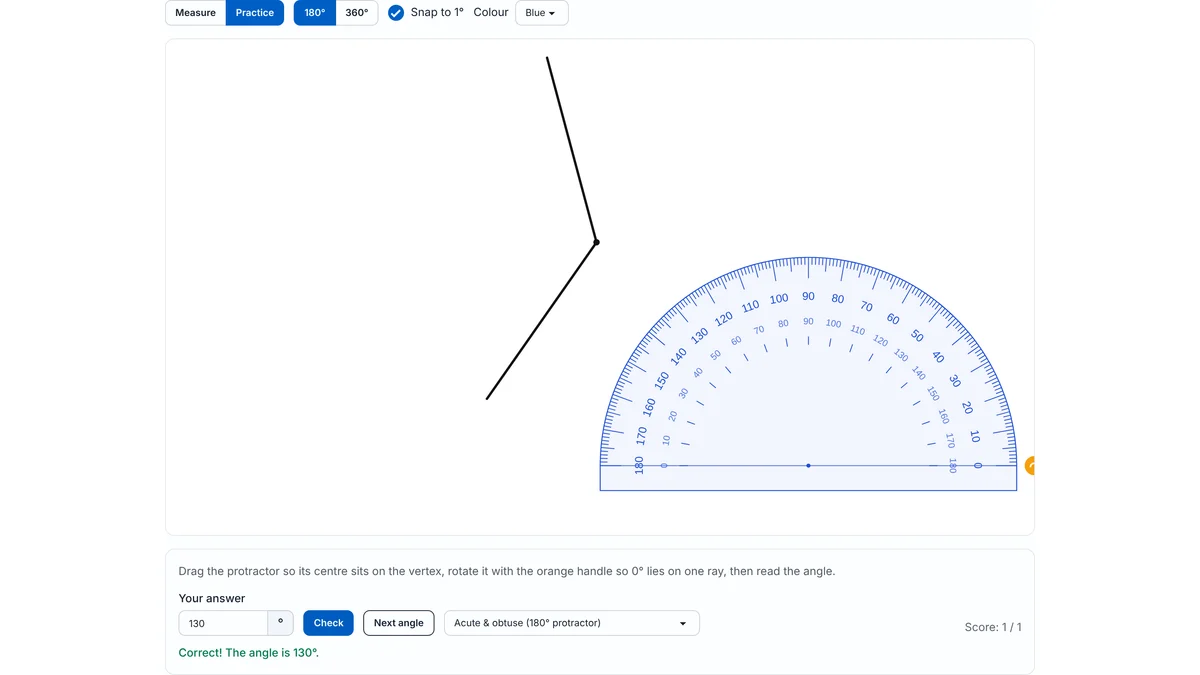
Practice mode draws a random angle. Line up the protractor, type your reading and press Check. It even spots when you read the wrong scale.
- 6
Real size or paper
Calibrate with a bank card to measure flat objects held against the screen, or download a printable PDF protractor that prints at true size.
How to measure an angle with a protractor (step by step)
To measure an angle, put the protractor’s centre mark on the vertex, line one ray up with 0°, and read the number where the other ray crosses the scale that starts at 0°. In detail:
- Place the centre mark (the small hole or cross on the straight edge) exactly on the vertex of the angle.
- Turn the protractor until its baseline lies along one ray. If the ray is too short to reach the scale, extend it with a ruler first.
- Find the 0° on that ray. Decide whether it belongs to the inner or the outer scale.
- Follow that same scale round to where the second ray crosses it, and read the number.
- Sanity-check: if the angle looks smaller than the corner of a page (90°), your answer should be less than 90°.
Inner scale or outer scale?
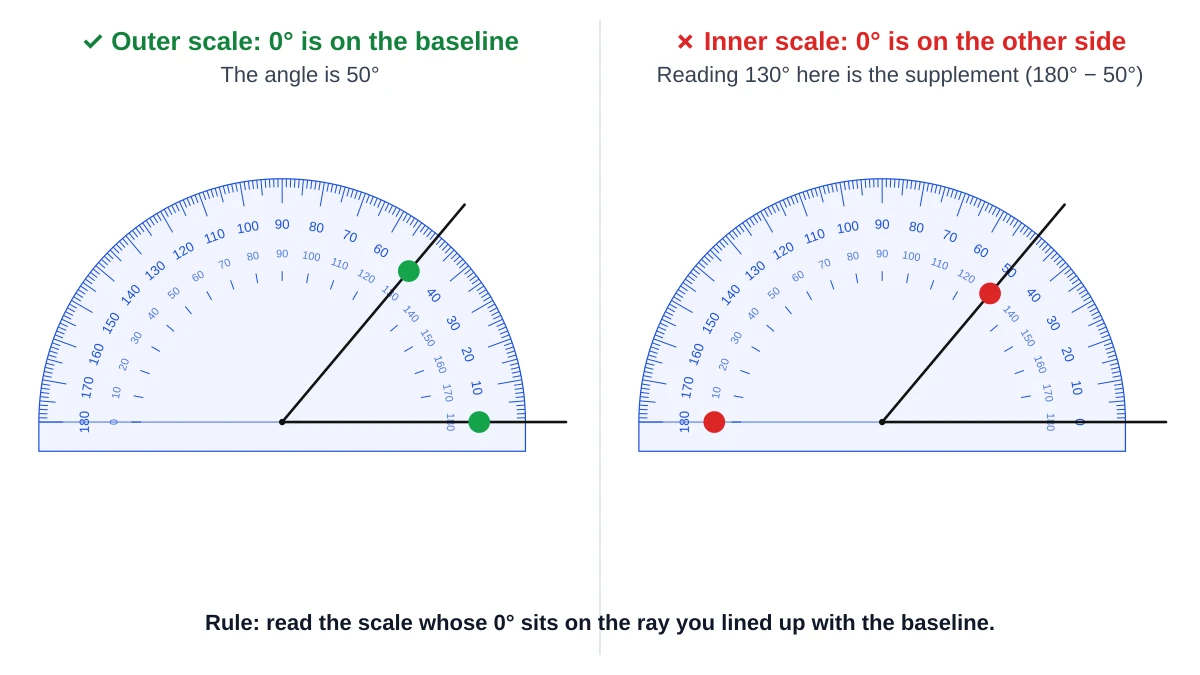
Every half protractor has two rows of numbers running in opposite directions. Use the scale whose 0° sits on your baseline ray. Reading the other scale gives the supplementary angle (180° minus the true angle), which is the most common protractor mistake.
Example: 50° or 130°?
An angle opens to the right, with its baseline pointing right. The outer scale reads 0° on that ray, so follow the outer numbers: the second ray crosses at 50°. The inner scale at the same spot says 130°, but the inner scale starts at 0° on the left, so it does not apply. 130° is 180° − 50°.
Types of angles and how to tell them apart
Before reading the exact number, compare the angle with a right angle. It is a quick check that catches scale mix-ups.
| Type | Size | Quick check |
|---|---|---|
| Acute | Less than 90° | Narrower than the corner of a page |
| Right | Exactly 90° | Fits the corner of a page exactly; marked with a small square |
| Obtuse | Between 90° and 180° | Wider than a page corner but not a straight line |
| Straight | Exactly 180° | A straight line |
| Reflex | Between 180° and 360° | The arc goes round the outside, more than half a turn |
How to measure a reflex angle
A reflex angle is bigger than 180°, so a half protractor cannot measure it directly. There are three ways:
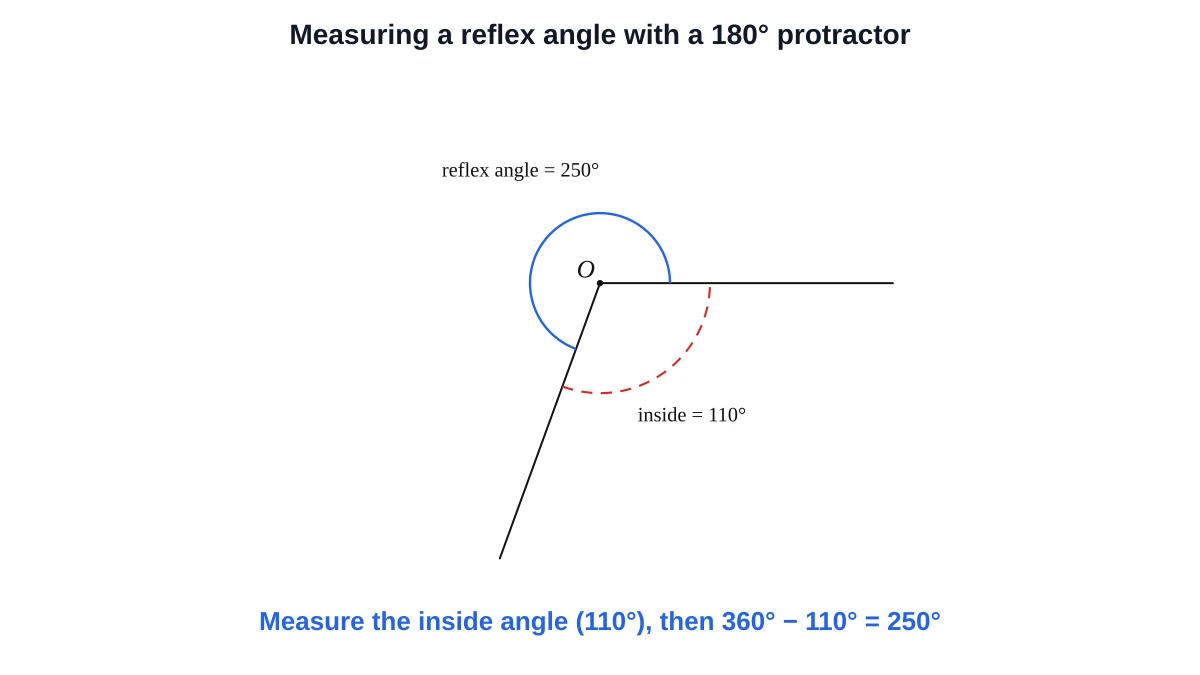
- Subtract from 360°: measure the smaller angle on the other side, then subtract it from 360°. If the inside angle is 110°, the reflex angle is 360° − 110° = 250°.
- Add to 180°: extend one ray backwards to make a straight line (180°), measure the extra part beyond it, and add 180°.
- Use a 360° protractor: switch this tool to 360° and read the reflex angle directly.
180° vs 360° protractor: which should you use?
| 180° (half circle) | 360° (full circle) | |
|---|---|---|
| Measures | 0° to 180° | 0° to 360° |
| Scales | Two, inner and outer, in opposite directions | Usually one, going all the way round |
| Reflex angles | Indirectly (360° minus the inside angle) | Directly |
| Best for | Classroom measuring and drawing, tests | Bearings, pie charts, navigation, reflex angles |
Common protractor mistakes
- Reading the wrong scale, which gives 180° minus the correct answer.
- Putting the bottom edge of the protractor, not its centre mark, on the vertex.
- Letting the baseline drift a few degrees off the ray, so every reading is off by the same amount.
- Rays too short to reach the numbers. Extend them with a ruler.
- Looking at a plastic protractor from an angle (parallax). Look straight down at the scale.
- Giving the small angle when the question asks for the reflex angle.
Using the online protractor in class
- Interactive whiteboards: the protractor works with touch, so students can come up and measure on a smartboard or a touchscreen laptop.
- Estimate, then reveal: hide the degrees, ask everyone to estimate, then turn the readout back on.
- Independent practice: practice mode gives endless random angles and catches wrong-scale readings with a specific hint.
- Worksheets: make matching printable angles with the Angle Maker, including a random “measure the angles” sheet with an answer key.
Measure real objects: calibration and printing
Screens differ in pixel density, so an on-screen protractor has no fixed physical size until you calibrate it. Click Calibrate, hold any bank or ID card against the screen and match the box to its width. Cards follow the ISO/IEC 7810 ID-1 size, 85.60 × 53.98 mm. After that, Use real size draws the protractor at a true radius in millimetres, so you can hold a flat object against the screen and measure its angle.
For a paper protractor, download the printable PDF (US Letter or A4). It contains a 180° and a 360° protractor plus a 10 cm ruler. Print at 100% or “Actual size” and check the ruler before cutting out.
Online protractor FAQ
Drag the protractor so its centre sits on the angle's vertex, rotate it with the orange handle so 0° lies along one ray, then drag the red arm to the other ray and read the degrees.
Read the scale that has 0° on the ray you lined up with the baseline. The other scale gives the supplement, for example 130° instead of 50°.
A standard half-circle protractor measures 0° to 180°. A full-circle protractor measures 0° to 360°.
Switch to the 360° protractor and read it directly, or measure the smaller angle on the other side and subtract it from 360°.
The on-screen reading is exact to about a pixel, and Snap to 1° rounds to whole degrees. Accuracy then depends on how carefully you line up the centre and baseline, just like with a plastic protractor.
Yes. Calibrate once with a bank card (85.6 mm wide), turn on Use real size, and hold a flat object against the screen. For angles in photos, use the Measure Angle from Photo tool.
Yes. Turn off Show degrees so students estimate or read the scale themselves, then turn it back on to reveal the answer.
Yes. You can drag the handles with a finger or a stylus, and the protractor resizes to fit the screen.
Yes. Download the printable PDF in US Letter or A4 and print at 100% (Actual size). The sheet has a 10 cm ruler so you can check the scale.
Yes. The online protractor is free, needs no account, and you may use screenshots and printouts in classroom or commercial teaching materials.
Last updated · GeometryKit is free to use for classroom and commercial worksheets.