Oblique and isometric solids
3D Shape Maker: Draw Solids in Oblique or Isometric View
This free 3D shape maker draws cubes, cuboids, prisms, pyramids, cylinders, cones, frustums and spheres in cavalier, cabinet or isometric projection. Hidden edges are dashed automatically and vertices are labelled like a textbook (ABCD–A₁B₁C₁D₁). No sign-up, runs in your browser, exports PNG or SVG, commercial use allowed.
- Free, no sign-up
- 9 solids, any size
- Oblique and isometric
- Dashed hidden edges
- PNG and SVG export
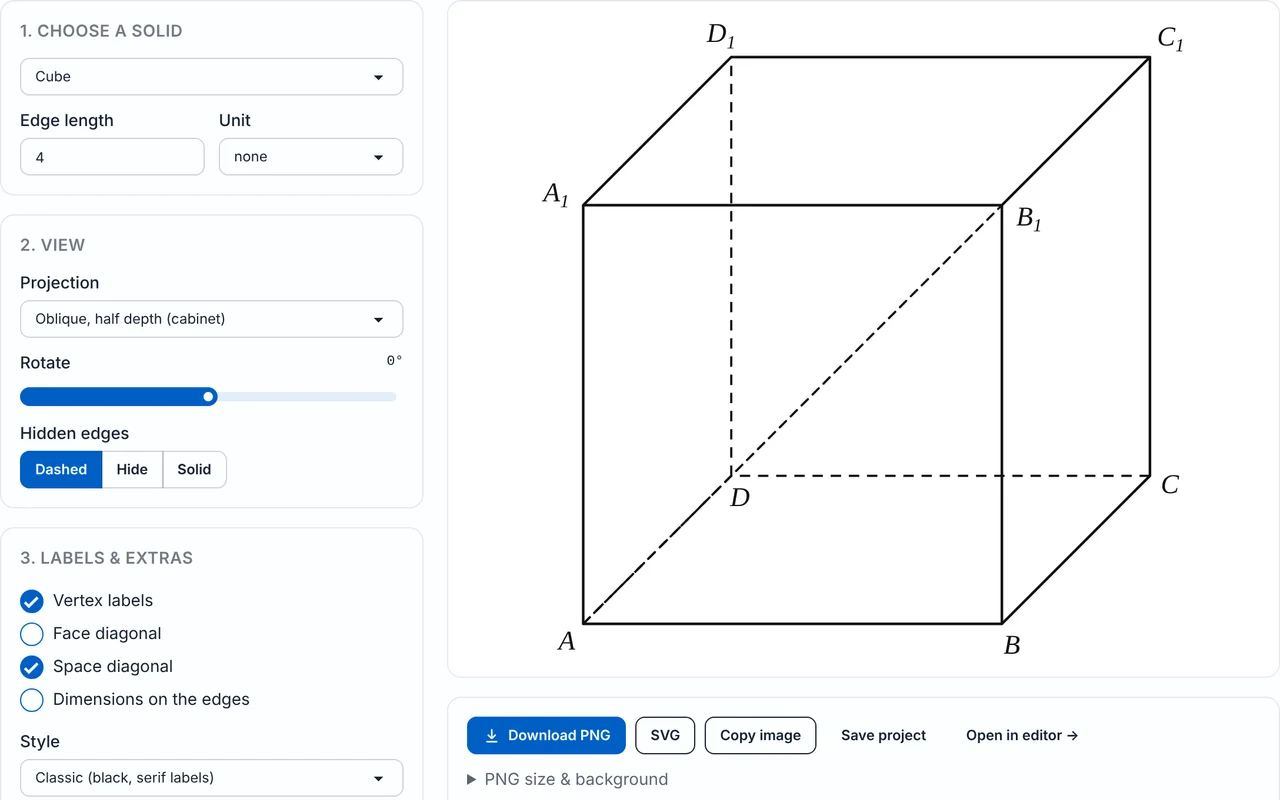
1. Choose a solid
2. View
3. Labels & extras
PNG size & background
The PNG stores its print size, so Word and Google Docs insert it at about 8 cm wide. Every PNG and SVG also contains the project, so you can drop it back into the Geometry Editor to keep editing.
Measurements
| Volume | 64 |
|---|---|
| Surface area | 96 |
| Face diagonal | 5.66 |
| Space diagonal | 6.93 |
| Faces / edges / vertices | 6 / 12 / 8 |
How to draw a 3D shape
- 1
Pick a solid
Choose a cube, cuboid, prism, pyramid, tetrahedron, cylinder, cone, frustum or sphere. Prisms and pyramids can have a base with 3 to 8 sides.
- 2
Enter the dimensions
Type the edge, or the length, width and height, or the radius and height, and pick a unit (none, cm, mm, m, in or ft). The drawing and the measures panel update as you type.
- 3
Choose the projection
Select Cabinet oblique, Cavalier oblique or Isometric, and use the Rotate slider to turn the solid about its vertical axis until the edges you want face you.
- 4
Set hidden edges and labels
Hidden edges can be Dashed, Hide or Solid. Switch vertex labels on or off, and add a face diagonal, a space diagonal, a height line or dimension labels where the solid allows them.
- 5
Pick a style
Choose Classic, Modern or Exam paper (thin lines) to match your worksheet or test.
- 6
Export or keep editing
Download a PNG (width in cm, 300 DPI, transparent background) or an SVG, copy the image, save the project, or use Open in editor to add points, segments, angle marks and text.
What the 3D shape maker draws
The 3D shape maker turns a solid and its dimensions into a flat, textbook-style drawing. Pick a shape, type a size and the figure is drawn in oblique or isometric projection, with the edges you cannot see dashed. It is a drawing tool for worksheets, tests and slides, not a 3D modelling program.
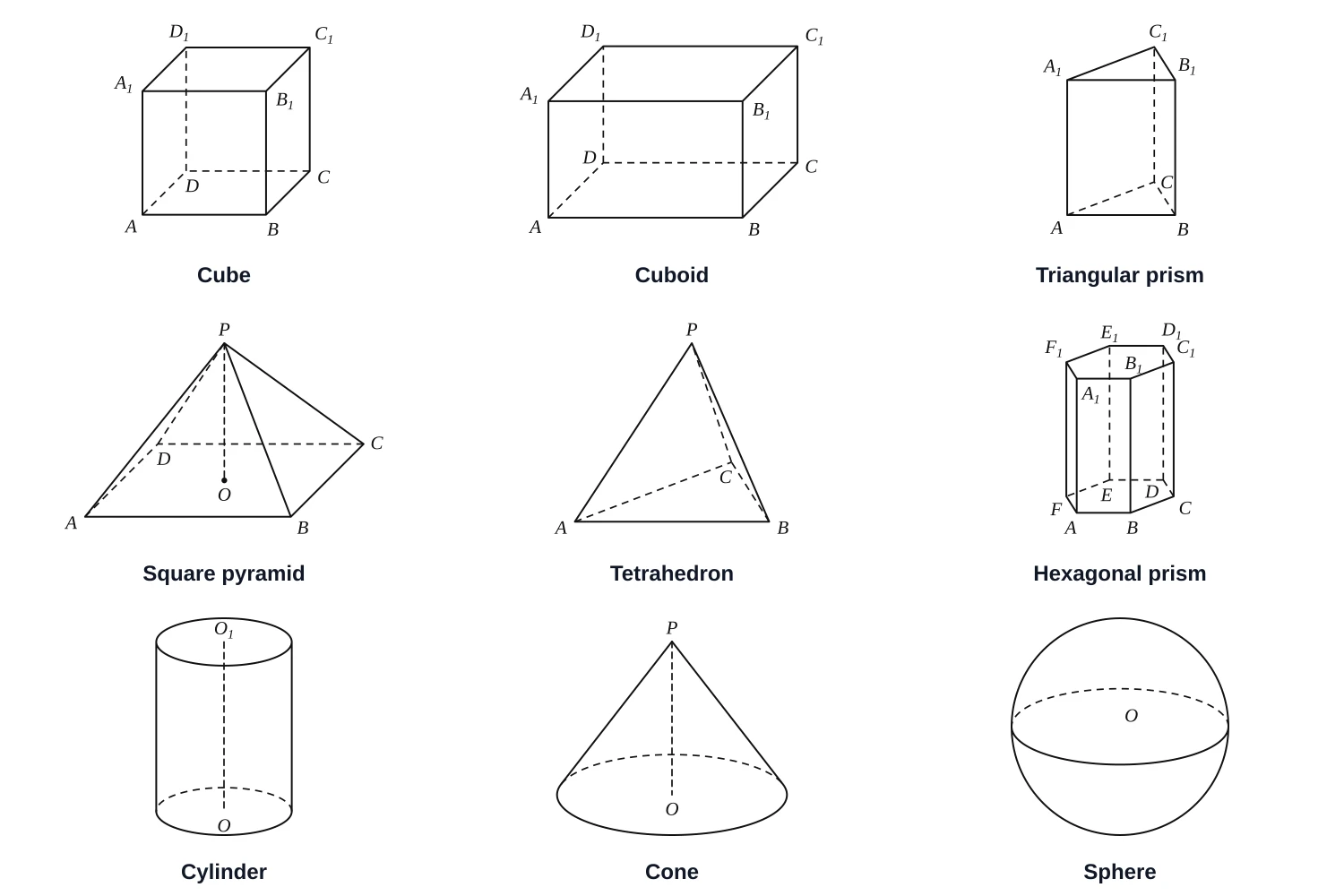
Solids you can draw
- Polyhedra: cube, cuboid (rectangular prism), regular prism with 3 to 8 sides (triangular prism by default), regular pyramid with 3 to 8 sides (square pyramid by default) and the regular tetrahedron.
- Curved solids: cylinder, cone, frustum (truncated cone) and sphere. Circles are drawn the textbook way, as horizontal ellipses.
- Free, no sign-up: the tool runs in your browser, and what you make can be used in classroom materials and commercial products (see the terms).
Open a solid directly
Each solid and projection has its own link, for example a cube in cabinet projection. Use shape= with cube, cuboid, prism, pyramid, tetrahedron, cylinder, cone, frustum or sphere, and projection= with cabinet, cavalier or isometric.
Cabinet, cavalier and isometric projection compared
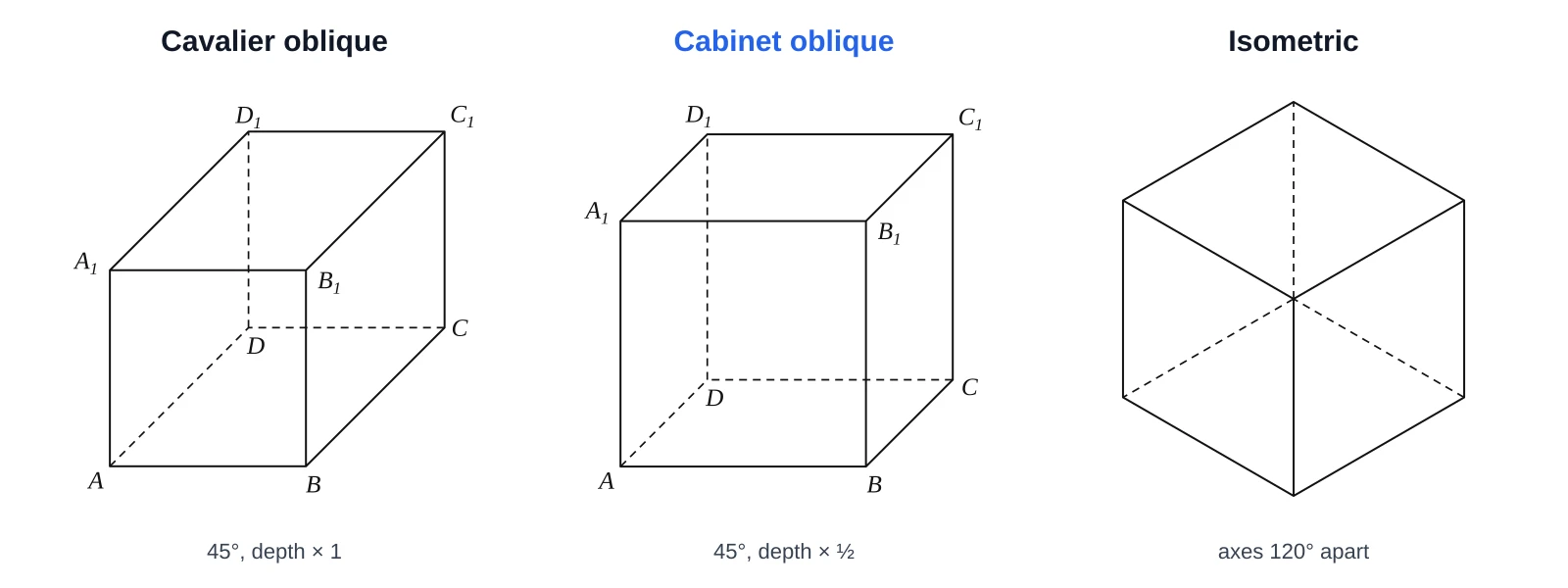
The three projections differ in how the depth direction is drawn. In both oblique projections the front face keeps its true shape. Cavalier draws depth edges at full length, cabinet draws them at half length, and isometric tilts all three axes equally.
| Projection | Front face | Axes | Depth scale | Typical use |
|---|---|---|---|---|
| Cavalier oblique | True shape | Receding axis at 45° (often 30–45°) | 1 (full length) | Quick sketches |
| Cabinet oblique | True shape | Receding axis at 45° | ½ | Looks less stretched; the Chinese textbook 斜二测 method |
| Isometric | No face keeps its true shape | All three axes 120° apart, 30° to the horizontal | 1 on every axis | Engineering-style views, puzzles |
Which one should I use?
- For most worksheets and tests, use cabinet: the half-length depth looks natural.
- Use cavalier when you want depth measured at the same scale as width and height.
- Use isometric when all three directions should look equally important.
The Rotate slider turns the solid about its vertical axis in any projection, so you can choose which edges face the viewer.
How to draw a cube in cabinet projection, step by step
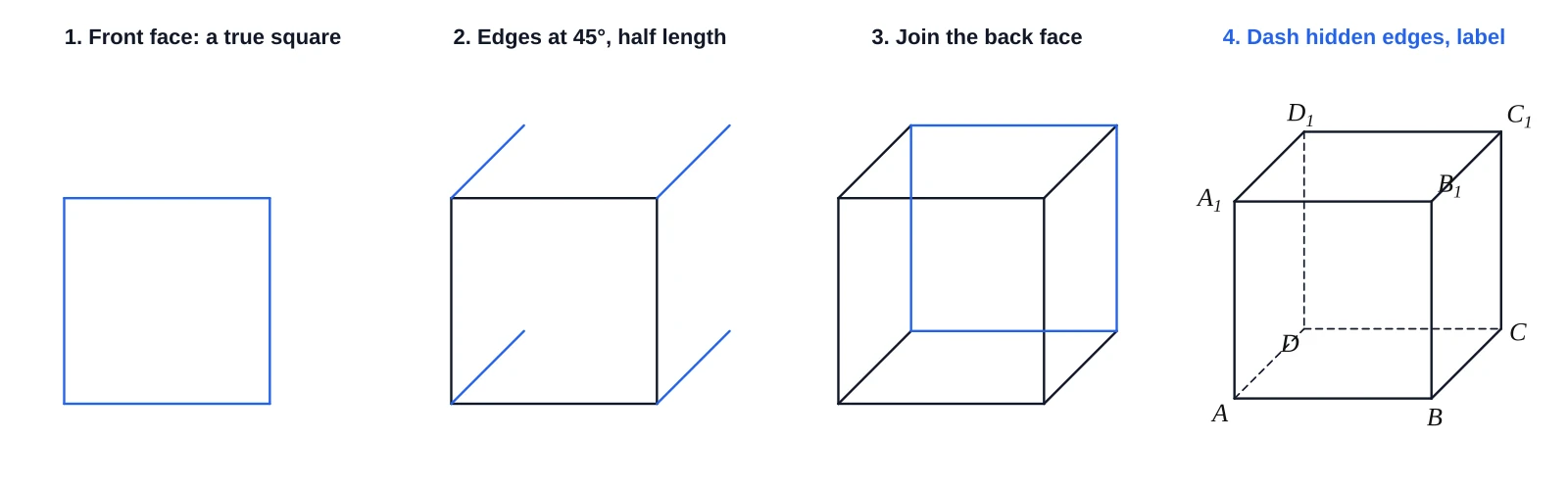
Cabinet projection keeps the front face as a true square and draws every depth edge at 45° and half length. The tool does these steps in one click; this is the method behind it.
- Draw the front face as a true square with side a.
- Choose the receding direction (45°) and the depth scale (½ for cabinet, 1 for cavalier).
- From each front vertex draw a line at 45°, half as long as a for cabinet.
- Join the end points to make the back face, an identical square.
- Draw the hidden edges as dashed lines. Seen from the front, above and right, the three edges meeting at the back-left-bottom vertex are hidden.
- Label the vertices ABCD on the base and A₁B₁C₁D₁ on the top, and add a diagonal if you need one.
Worked example: cube with a = 4
Faces, edges and vertices of common solids
For every polyhedron, vertices − edges + faces = 2 (Euler’s formula). The measures panel shows the count for the solid you have drawn.
| Solid | Faces | Edges | Vertices |
|---|---|---|---|
| Cube or cuboid | 6 | 12 | 8 |
| Triangular prism | 5 | 9 | 6 |
| Hexagonal prism | 8 | 18 | 12 |
| Square pyramid | 5 | 8 | 5 |
| Pentagonal pyramid | 6 | 10 | 6 |
| Regular tetrahedron | 4 | 6 | 4 |
Check with the cube: 8 − 12 + 6 = 2.
Vertex labels and dimensions
Labels follow the names used in textbooks and can be switched on or off:
- Cube and cuboid: ABCD on the base, A₁B₁C₁D₁ on the top.
- Prism: ABC–A₁B₁C₁ (triangular prism).
- Pyramid: apex P, base ABCD and base centre O.
- Cylinder and frustum: centres O and O₁.
- Cone: apex P and base centre O.
- Sphere: centre O.
Dimension labels show the lengths you entered, with the unit you chose. The height line is available for pyramids, cones, cylinders and frustums.
Diagonals, volume and surface area
The measures panel gives the volume, the surface area, the number of faces, edges and vertices, and the diagonal or slant-height lengths. The face diagonal and space diagonal can also be drawn on a cube or cuboid.
| Solid | Dimensions | Volume | Surface area | Other length |
|---|---|---|---|---|
| Cube | a = 4 | 64 | 96 | Face diagonal 4√2 ≈ 5.66; space diagonal 4√3 ≈ 6.93 |
| Cuboid | 5 × 4 × 3 | 60 | 94 | Space diagonal √50 ≈ 7.07 |
| Square pyramid | Base 6, height 4 | 48 | 96 | Slant height 5 |
| Cylinder | r = 2, h = 5 | 20π ≈ 62.83 | 28π ≈ 87.96 | – |
| Cone | r = 3, h = 4 | 12π ≈ 37.70 | 24π ≈ 75.40 | Slant height 5 |
| Sphere | r = 3 | 36π ≈ 113.10 | 36π ≈ 113.10 | – |
Space diagonal of a cuboid = √(a² + b² + c²)
For a cuboid 5 × 4 × 3 the space diagonal is √(25 + 16 + 9) = √50 ≈ 7.07. A cuboid with sides 3, 4 and 12 has a space diagonal of √169 = 13.
For a square pyramid with base 6 and height 4, the slant height is √(3² + 4²) = 5, the volume is ⅓ × 36 × 4 = 48 and the surface area is 36 + 4 × ½ × 6 × 5 = 96.
Exporting, styles and who it is for
Download a PNG sized in centimetres at 300 DPI with a transparent background, or an SVG, copy the image, or save the project. Open in editor opens the figure in the Geometry Editor so you can add points, segments, angle marks and text.
- Classic, Modern and Exam paper styles; Exam paper uses thin lines for tests.
- Teachers and tutors make test and worksheet figures for prisms, pyramids and curved solids.
- Students check hand-drawn oblique drawings and hidden edges.
- Worksheet creators may use the exports in products they sell. Commercial use is allowed; GeoGebra, by comparison, requires a separate licence for commercial use. See the terms.
To build a net you can print and fold instead, use the nets of 3D shapes tool.
3D shape maker FAQ
A tool that draws a solid such as a cube, prism, pyramid or cylinder from the dimensions you enter, as a flat figure you can print or paste into a document. This one draws oblique and isometric views with dashed hidden edges.
Yes. It is free, needs no sign-up and runs in your browser. You can export PNG or SVG and use them in classroom materials and commercial products.
In oblique projection the front face is drawn true to shape and the depth edges recede at an angle, here 45°. In cavalier projection they keep full length; in cabinet projection they are halved.
The depth scale. Cavalier draws depth edges at full length (scale 1) and cabinet draws them at half length (scale ½), which looks less stretched. Both keep the front face true.
Draw the front face as a true square, then draw each depth edge at 45° at half length (cabinet), join the ends for the back face and dash the hidden edges. The tool does this automatically.
Draw them as dashed lines. An edge is hidden when every face that contains it faces away from the viewer. The tool finds these edges automatically and lets you choose Dashed, Hide or Solid.
No. Oblique projection keeps one face true to shape and draws depth at an angle. Isometric projection draws all three axes 120° apart at equal scale, so no face keeps its true shape.
A square pyramid has 5 faces, 8 edges and 5 vertices. A triangular prism has 5 faces, 9 edges and 6 vertices, and a cube has 6 faces, 12 edges and 8 vertices.
It is the segment joining two opposite vertices through the inside. Its length is √(a² + b² + c²). For a cuboid 5 × 4 × 3 it is √50 ≈ 7.07, and for a cube with edge a it is a√3.
Yes. Commercial use is allowed and no attribution is required. See the terms page for details.
Yes. Use Open in editor to add points, segments, angle marks and text, or save the project and reload it later.
Last updated · GeometryKit is free to use for classroom and commercial worksheets.