Regular polygon generator
Polygon Maker – Draw Regular and Custom Polygons
Polygon Maker draws any regular polygon from its number of sides and one size (side length, radius or apothem), or a custom polygon from vertex coordinates or from side lengths and angles. It labels the vertices, marks angles and equal sides, shows diagonals, the apothem and radius, and calculates the area, perimeter and every angle. Free, no sign-up, with PNG and SVG export you can use commercially.
- Free, no sign-up
- 3 to 60 sides
- Area, angles, apothem
- Custom & concave shapes
- PNG · SVG · copy
Regular polygon
Labels & marks
PNG size & background
The PNG stores its print size, so Word and Google Docs insert it at about 8 cm wide. Every PNG and SVG also contains the project, so you can drop it back into the Geometry Editor to keep editing.
Measurements
regular hexagon
| Side length | 5 cm |
|---|---|
| Radius (circumradius) | 5 cm |
| Apothem (inradius) | 4.33 cm |
| Perimeter | 30 cm |
| Area | 64.952 cm² |
| Each interior angle | 120° |
| Each exterior angle | 60° |
| Sum of interior angles | 720° |
| Central angle | 60° |
| Number of diagonals | 9 |
How to use the polygon maker
- 1
Pick the type
Regular for equal sides and angles, Coordinates to type the vertices, or Sides & angles to walk around the shape.
- 2
Enter the size
For a regular polygon, type the number of sides and the side length, radius or apothem. Shortcut buttons pick a pentagon, hexagon, octagon and so on.
- 3
Choose what to show
Show one or all side lengths and angles, equal-side ticks, diagonals, the centre, radius, apothem, circumcircle or incircle.
- 4
Make a question (optional)
Turn on Hide values to replace the numbers with “?” in the question version. The answer key keeps them.
- 5
Read the results
The table under the drawing lists the area, perimeter, interior and exterior angles, the angle sum and the number of diagonals.
- 6
Export
Download a PNG or SVG, copy the image into Google Docs, Slides or Word, or open it in the Geometry Editor to add more.
Regular polygon formulas
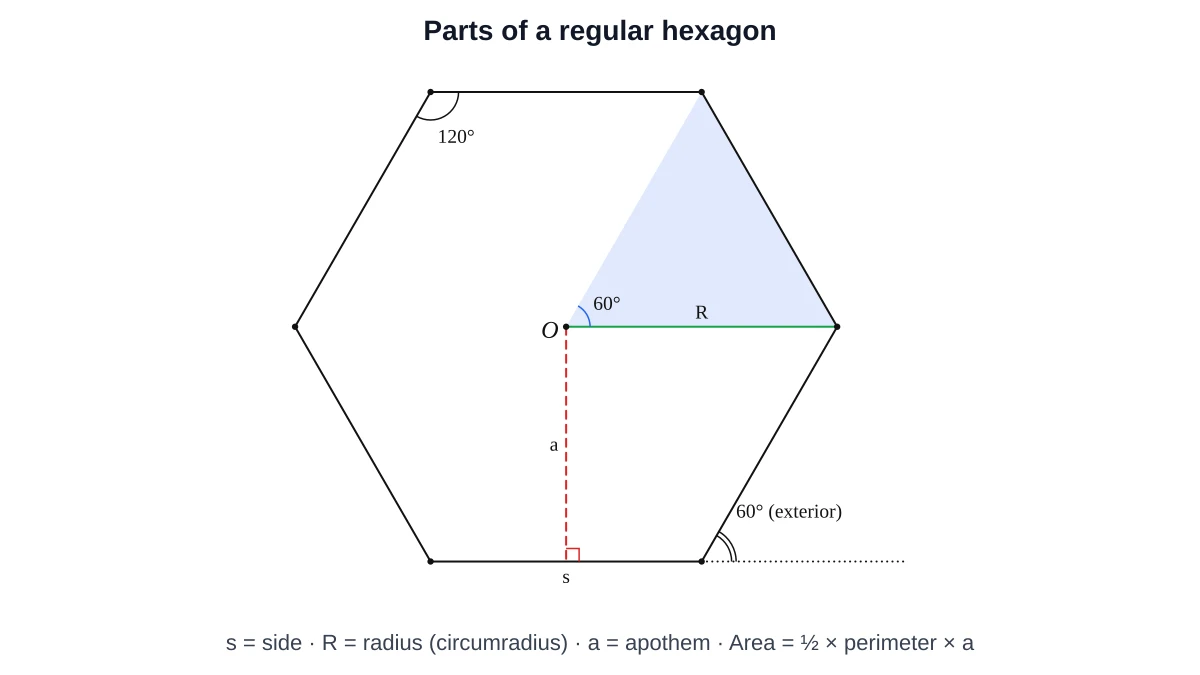
For a regular polygon with n sides of length s, circumradius R (centre to a corner) and apothem a (centre to the middle of a side):
Sum of the interior angles
Sum = (n − 2) × 180°
Any polygon can be cut into n − 2 triangles by drawing every diagonal from one vertex, and each triangle has 180°. This works for irregular and concave polygons too. Turn on Diagonals → From one vertex to see it.
Each interior and exterior angle
Interior = (n − 2) × 180° / n, Exterior = 360° / n
Number of diagonals
Diagonals = n(n − 3) / 2
Apothem and radius
a = s / (2 tan(180°/n)), R = s / (2 sin(180°/n))
Area
Area = ½ × perimeter × apothem = n s² / (4 tan(180°/n))
Regular polygon reference table (3 to 12 sides)
The last three columns are for a side length of 1. For side length s, multiply the area by s² and the radius and apothem by s.
| Sides – name | Interior angle | Angle sum | Exterior angle | Diagonals | Area (s = 1) | Radius (s = 1) | Apothem (s = 1) |
|---|---|---|---|---|---|---|---|
| 3 – Triangle | 60° | 180° | 120° | 0 | 0.433 | 0.5774 | 0.2887 |
| 4 – Square | 90° | 360° | 90° | 2 | 1 | 0.7071 | 0.5 |
| 5 – Pentagon | 108° | 540° | 72° | 5 | 1.7205 | 0.8507 | 0.6882 |
| 6 – Hexagon | 120° | 720° | 60° | 9 | 2.5981 | 1 | 0.866 |
| 7 – Heptagon | 128.57° | 900° | 51.43° | 14 | 3.6339 | 1.1524 | 1.0383 |
| 8 – Octagon | 135° | 1080° | 45° | 20 | 4.8284 | 1.3066 | 1.2071 |
| 9 – Nonagon | 140° | 1260° | 40° | 27 | 6.1818 | 1.4619 | 1.3737 |
| 10 – Decagon | 144° | 1440° | 36° | 35 | 7.6942 | 1.618 | 1.5388 |
| 11 – Hendecagon | 147.27° | 1620° | 32.73° | 44 | 9.3656 | 1.7747 | 1.7028 |
| 12 – Dodecagon | 150° | 1800° | 30° | 54 | 11.1962 | 1.9319 | 1.866 |
Worked examples
Regular hexagon with side 10
Interior angle = (6 − 2) × 180° / 6 = 120°. Apothem a = 10 / (2 tan 30°) ≈ 8.66, and the radius equals the side, R = 10. Perimeter = 60, so area = ½ × 60 × 8.66 ≈ 259.81. Open this hexagon.
Regular pentagon with side 6
Interior angle = 3 × 180° / 5 = 108°. Apothem ≈ 6 / (2 tan 36°) ≈ 4.13 and perimeter = 30, so area ≈ ½ × 30 × 4.13 ≈ 61.94. Open this pentagon.
How many sides if each interior angle is 156°?
Each exterior angle is 180° − 156° = 24°. The exterior angles add up to 360°, so n = 360° / 24° = 15 sides (a pentadecagon).
Polygon names and types
| Type | Meaning |
|---|---|
| Regular | All sides equal and all angles equal, like a square or a stop-sign octagon |
| Irregular | Sides or angles are not all equal |
| Convex | Every interior angle is less than 180°; no corner points inwards |
| Concave | At least one interior angle is more than 180° (a reflex angle) |
| Simple | The sides do not cross each other. The polygon maker only draws simple polygons |
| n-gon | A general name for a polygon with n sides, such as a 13-gon |
Common names: triangle (3), quadrilateral (4), pentagon (5), hexagon (6), heptagon (7), octagon (8), nonagon (9), decagon (10), hendecagon (11), dodecagon (12), pentadecagon (15) and icosagon (20).
Custom polygons: area from coordinates (shoelace formula)
In Coordinates mode, list the vertices in order around the shape, clockwise or anticlockwise. The polygon maker finds the area with the shoelace formula:
Area = ½ |(x₁y₂ − x₂y₁) + (x₂y₃ − x₃y₂) + … + (xₙy₁ − x₁yₙ)|
It also measures every side and every interior angle, including reflex angles at the inward corners of concave shapes, and checks that the angles add up to (n − 2) × 180°.
In Sides & angles mode you describe the shape the way a construction question does: “AB = 6 cm, angle B = 100°, BC = 4 cm …”. The last side is drawn automatically to close the shape.
Using polygons in worksheets and designs
- Angle-sum practice: show the diagonals from one vertex and ask students how many triangles they see.
- “Find the missing angle”: draw an irregular polygon in Coordinates mode, show all angles, and hide them in the question version.
- Area and apothem problems: show the apothem and one side, then ask for the area.
- Tessellations and designs: export SVG hexagons, octagons and triangles at an exact size for Canva, Cricut or laser-cutting software.
Polygon maker FAQ
Choose Regular, enter the number of sides and one size: the side length, the radius (centre to corner) or the apothem (centre to the middle of a side). The polygon is drawn and labeled immediately.
Each interior angle is (n − 2) × 180° / n, where n is the number of sides. A regular octagon has interior angles of 135°.
(n − 2) × 180°. A hexagon's angles add up to 720°, and this is true for irregular hexagons too.
n(n − 3) / 2. A pentagon has 5 diagonals, a hexagon 9 and a decagon 35.
Area = ½ × perimeter × apothem, or n·s² / (4·tan(180°/n)). A regular hexagon with side 10 has an area of about 259.81.
The apothem is the distance from the centre of a regular polygon to the midpoint of a side. It meets the side at a right angle and equals the radius of the inscribed circle.
A regular polygon has all sides equal and all angles equal. An irregular polygon does not. Both kinds can be drawn with the polygon maker.
Yes. Regular mode accepts 3 to 60 sides, and the formulas work for any number of sides.
Yes. Choose Coordinates, enter the vertices in order, and the tool draws the shape and gives the perimeter, the area (shoelace formula) and every interior angle.
Yes. Copy the image or download a PNG or SVG. Images you make here may be used in classroom and commercial materials without attribution.
Last updated · GeometryKit is free to use for classroom and commercial worksheets.