Coordinate plane worksheet generator
Printable Coordinate Plane: Blank Grids and Worksheets with Answer Keys
Make a free printable coordinate plane for US Letter or A4: a blank grid, or a plot-the-points, write-the-coordinates or mystery picture worksheet with an answer key. Made for teachers, parents and students, it exports a vector PDF (and PNG/SVG for one grid), and commercial use is allowed.
- Free, no sign-up
- 4 page types
- Answer key included
- PDF, PNG and SVG
- Letter or A4
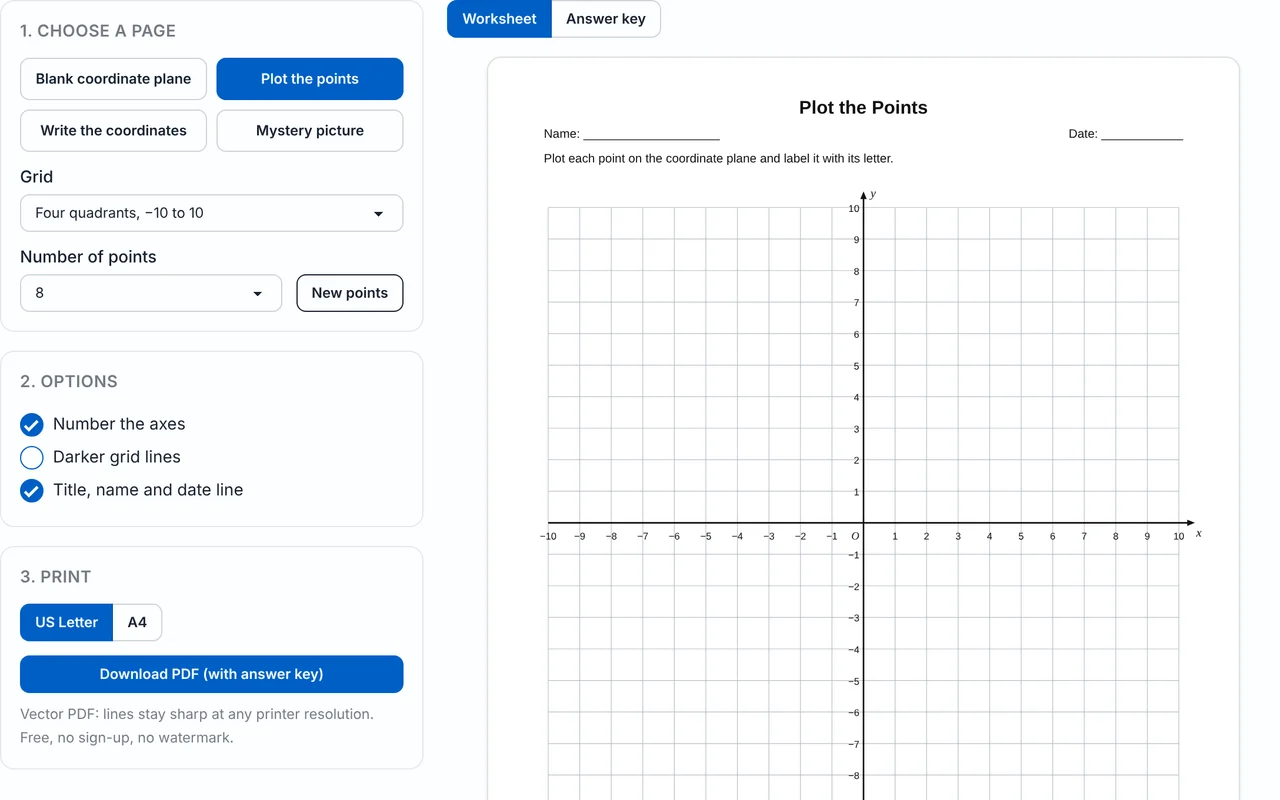
1. Choose a page
2. Options
3. Print
Vector PDF: lines stay sharp at any printer resolution. Free, no sign-up, no watermark.
One grid as an image for Word or Google Docs
PNG size & background
The PNG stores its print size, so Word and Google Docs insert it at about 10 cm wide. Every PNG and SVG also contains the project, so you can drop it back into the Geometry Editor to keep editing.
How to make a printable coordinate plane
- 1
Choose a page type
Pick Blank coordinate plane, Plot the points, Write the coordinates or Mystery picture.
- 2
Choose the grid
Select Four quadrants −10 to 10, −5 to 5 or −12 to 12, or First quadrant 0 to 10 or 0 to 20. For a blank page also choose 1, 2, 4 or 6 grids per page.
- 3
Set the content
For point worksheets choose 4 to 12 points and press New points for a fresh set. For a mystery picture choose house, star, sailboat, rocket or fish.
- 4
Set the options
Turn axis numbers, darker grid lines and the title, name and date line on or off, and pick US Letter or A4. Switch the preview between Worksheet and Answer key.
- 5
Download and print
Click Download PDF. The file has the worksheet on page 1 and the answer key on page 2. Print at 100% (Actual size).
- 6
Or export one grid as an image
Choose a width in cm and download a PNG or SVG (300 DPI) to paste into Word or Google Docs, or open the grid in the editor to add your own points and shapes.
Free blank coordinate plane PDFs
These ready-made PDFs are free to download and print, with no sign-up and no watermark. Every file comes in US Letter and A4, and every square is one unit. Need a different range or layout? Open the generator.
| Grid | Layout | US Letter | A4 |
|---|---|---|---|
| Four quadrants, −10 to 10 | 1 grid per page, numbered, name and date line | ||
| Four quadrants, −10 to 10 | 4 small grids per page | ||
| Four quadrants, −5 to 5 | 6 small grids per page | ||
| First quadrant, 0 to 20 | 1 grid per page | ||
| First quadrant, 0 to 10 | 4 small grids per page | ||
| Mystery picture: rocket | Worksheet plus answer key (2 pages) |
Which grid should I choose?
| Grid | Quadrants | Good for |
|---|---|---|
| First quadrant 0 to 10 | I only | First lessons on ordered pairs, positive numbers only |
| First quadrant 0 to 20 | I only | Longer scales, bigger pictures, maps |
| Four quadrants −5 to 5 | I to IV | Introducing negative coordinates; small grids (6 per page) |
| Four quadrants −10 to 10 | I to IV | The standard grid for plotting, reflections and mystery pictures |
| Four quadrants −12 to 12 | I to IV | Larger figures that need more room |
Every grid has arrowheads on the axes, x and y labels and the origin marked O. Turn Number the axes off for a grid with no numbers, or turn on Darker grid lines if the sheet will be photocopied.
Coordinate plane worksheet generator with answer key
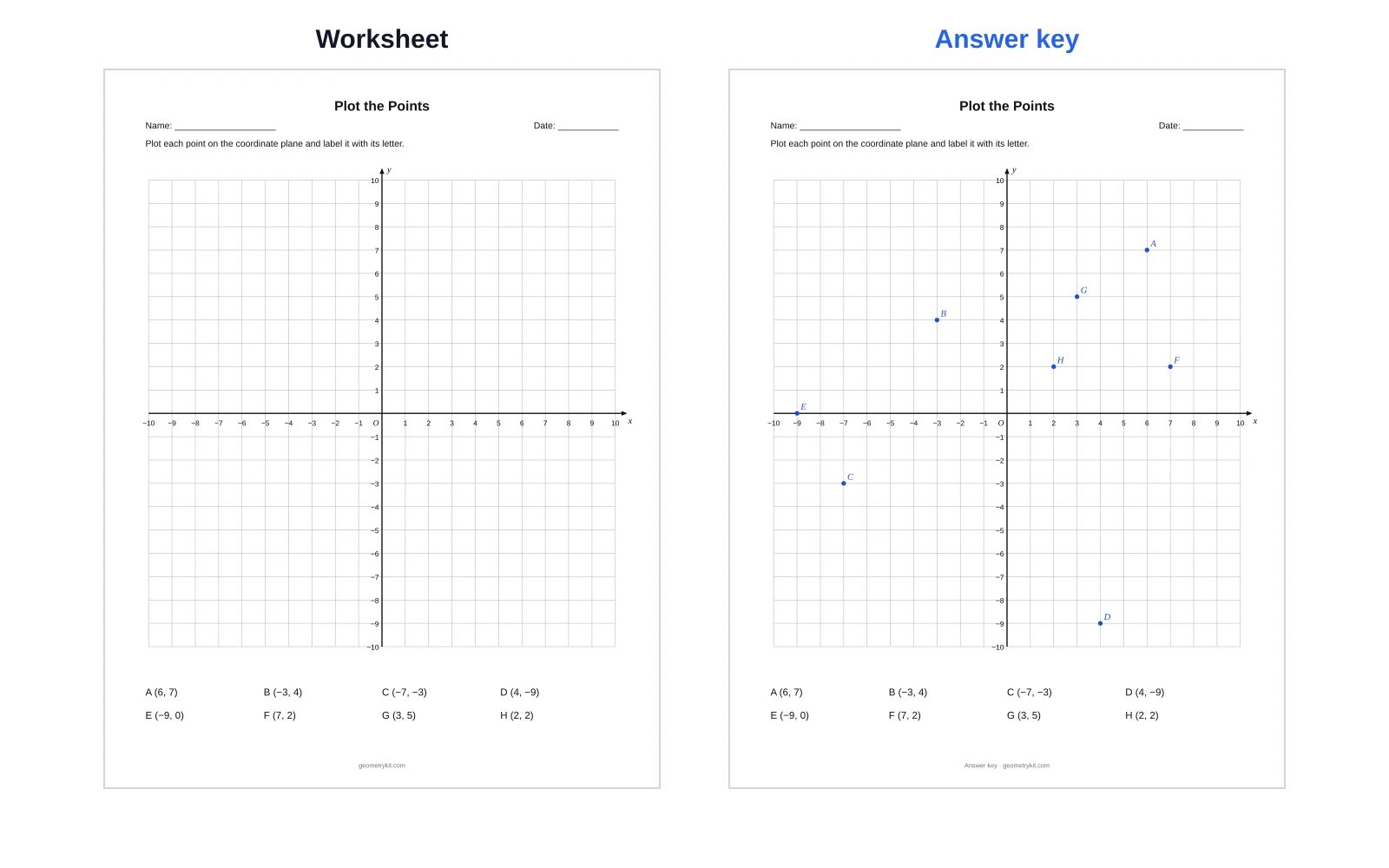
Besides blank grids, the tool builds three kinds of worksheet. Each PDF has two pages: the worksheet, then an answer key with the solution drawn in blue. Use the Worksheet / Answer key toggle to check either page before you download.
Plot the points
The page lists points A, B, C… as ordered pairs under an empty grid, and students plot them. Choose 4 to 12 points; on a four-quadrant grid the first four points always fall one in each quadrant. Press New points for a new set whenever you want a different sheet. Make a plot-the-points sheet.
Write the coordinates
The points are already drawn and labelled on the grid. Students read each point and write its (x, y) pair on the blanks. Make a first-quadrant sheet.
Answer key from the same sheet
Page 2 of every worksheet PDF is the answer key: the points plotted, the coordinates filled in, or the finished picture, all in blue. The key always matches the worksheet because both come from the same set of points.
Coordinate plane mystery picture worksheets
In a mystery picture, students plot a list of ordered pairs and join the points in order to reveal a drawing. There are five pictures: house, star, sailboat, rocket and fish, on a four-quadrant (−10 to 10) or first-quadrant (0 to 20) grid.
- Plot every point in the list, in order.
- Join each point to the next with a straight line.
- When the list says Lift pencil, do not draw a line to the next point. Start a new stroke there.
- Check against the answer key on page 2.
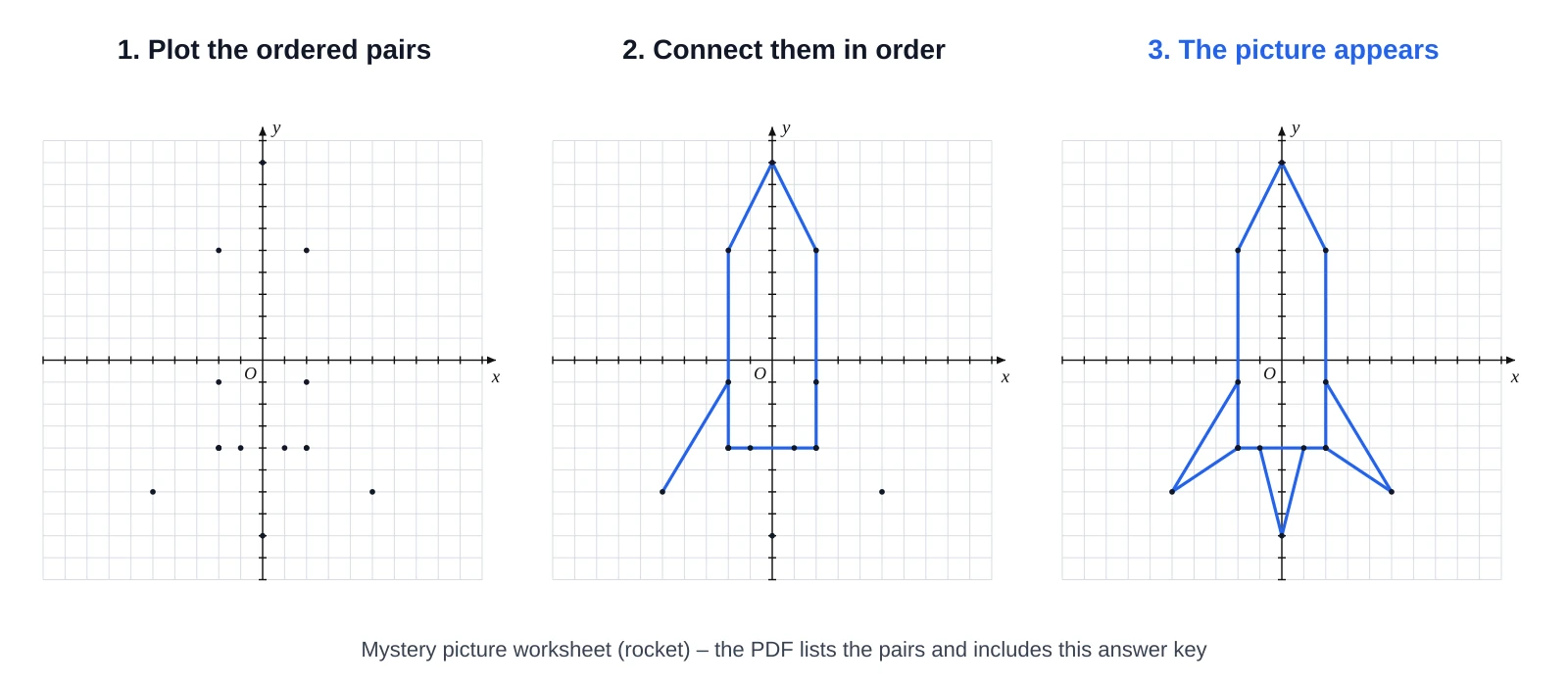
A wrong point shows up straight away as a kink in the picture, so students can find their own mistakes. Open the rocket picture.
How to plot a point on a coordinate plane
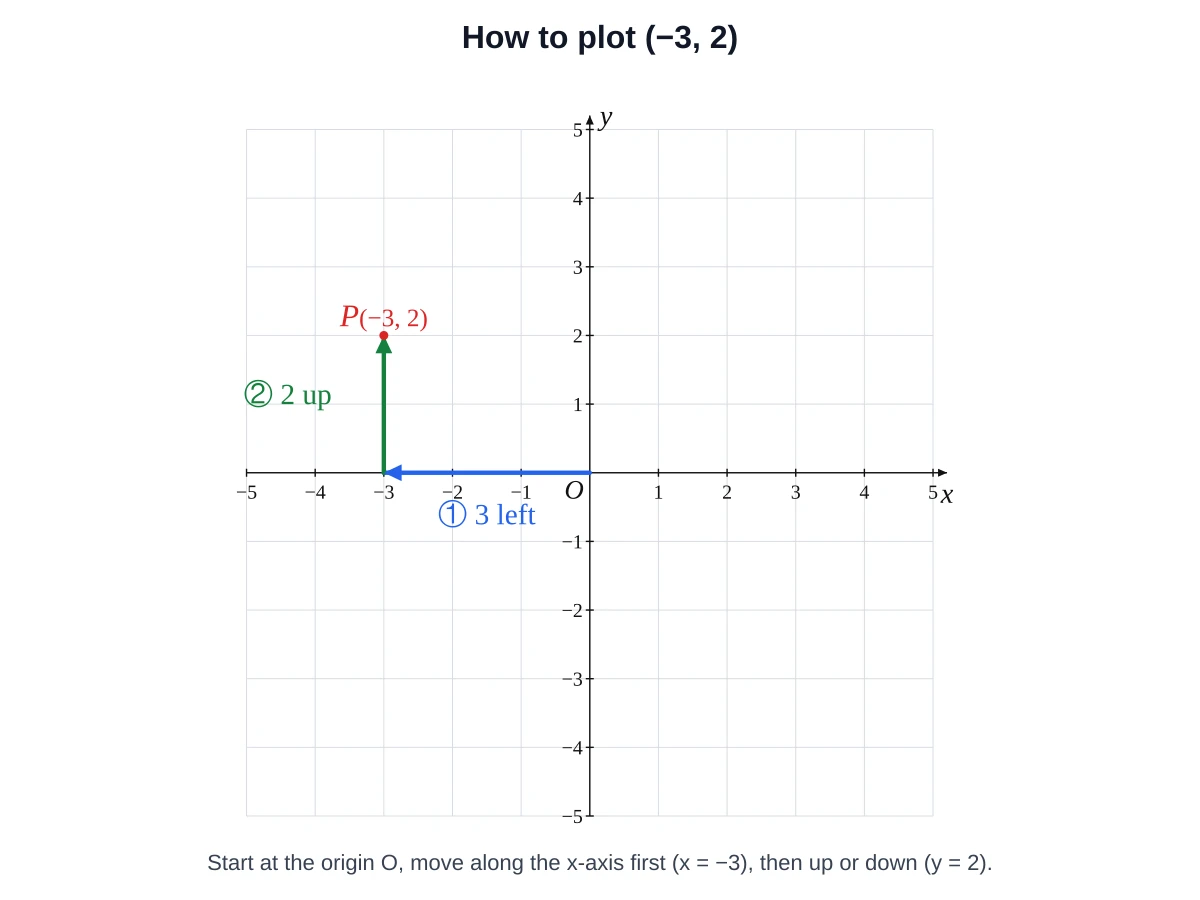
To plot a point, start at the origin, move along the x-axis by the first number, then up or down by the second number, and mark the spot.
- Start at the origin (0, 0), where the axes cross.
- The first number is x. Move that many units right if it is positive or left if it is negative.
- The second number is y. From there, move that many units up if it is positive or down if it is negative.
- Mark the point and label it.
Plot (−3, 2)
The four quadrants and their signs
The axes divide the plane into four quadrants, numbered anticlockwise starting at the top right. A point on an axis, such as (0, 4) or (−5, 0), is not in any quadrant.
| Quadrant | x | y | Example | Where |
|---|---|---|---|---|
| I | + | + | (3, 2) | Top right |
| II | − | + | (−3, 2) | Top left |
| III | − | − | (−3, −2) | Bottom left |
| IV | + | − | (3, −2) | Bottom right |
| On an axis | (0, 4) or (−5, 0) | Belongs to no quadrant |
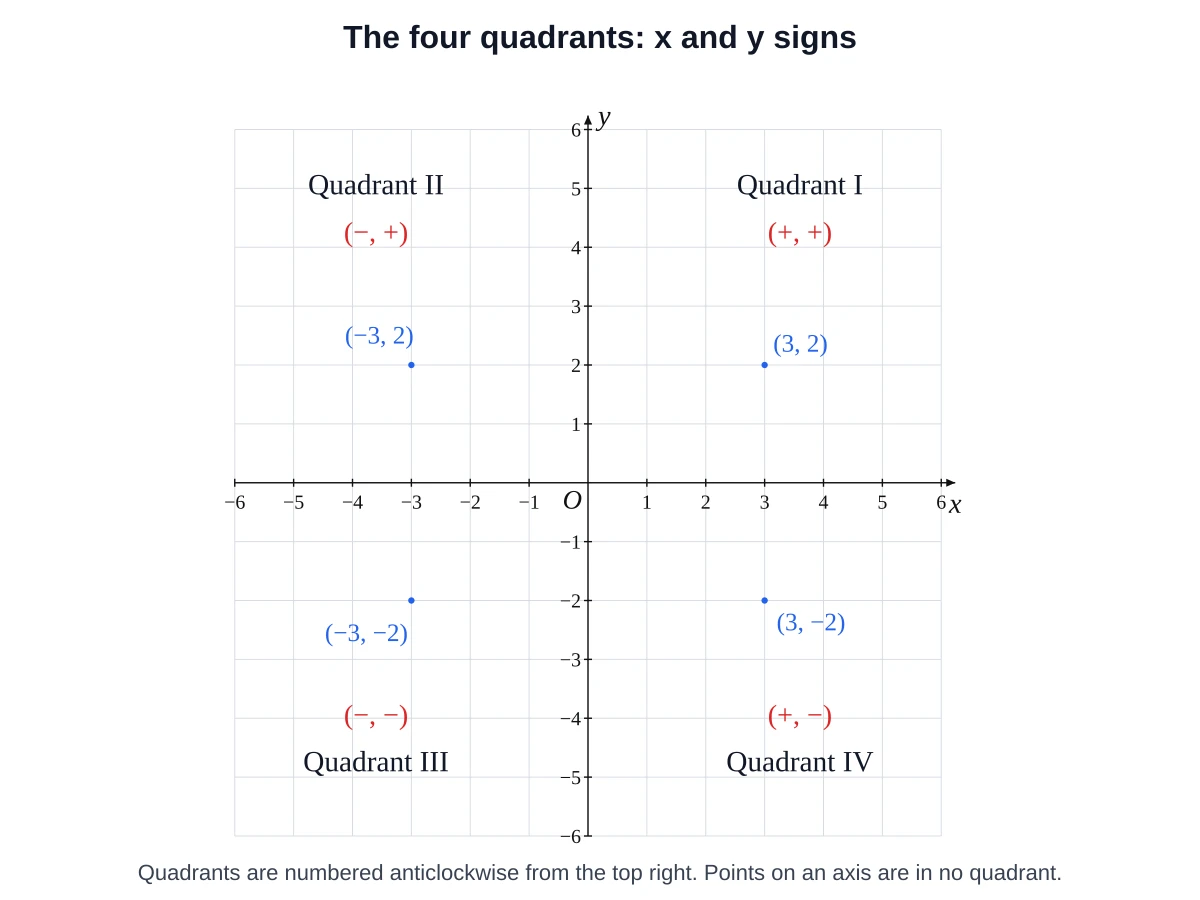
Reading coordinates: x first, then y
An ordered pair is written (x, y): the horizontal position comes first and the vertical position second. Order matters, so (2, 5) and (5, 2) are different points.
Common mistakes
- Swapping x and y, for example plotting (2, 5) as (5, 2).
- Counting the origin as 1 instead of starting from 0.
- Treating a point on an axis as if it were inside a quadrant.
- Reading (3, −2) as Quadrant II. Positive x and negative y is Quadrant IV.
- Mixing up the grid lines and the spaces between them. On these grids each square is one unit and the numbers sit on the lines.
Distance along a grid line
When two points have the same y, subtract their x-values. From (−3, 2) to (4, 2) the distance is 4 − (−3) = 7 units. The same idea works for points with the same x.
Curriculum links
| Curriculum | Where coordinate planes appear |
|---|---|
| US Common Core 5.G.A.1 | Use perpendicular number lines (axes) with the origin at 0; locate a point with an ordered pair |
| US Common Core 5.G.A.2 | Graph points in the first quadrant to solve real-world and mathematical problems |
| US Common Core 6.NS.C.6 | Understand signs of ordered pairs as locations in the quadrants; find and plot rational-number pairs |
| US Common Core 6.NS.C.8 | Graph points in all four quadrants; use coordinates to find distances between points with the same x or y |
| England (KS2) | Year 4: coordinates in the first quadrant; Year 6: the full coordinate grid (all four quadrants) |
Use the first-quadrant grids for the 5.G standards and the four-quadrant grids for 6.NS.
Worksheet ideas for the classroom and homeschool
- Warm-up: a Plot the points sheet with five points as a five-minute starter.
- Early finishers: a mystery picture, with the answer key kept at the front.
- Exit ticket: a Write the coordinates sheet at the end of the lesson.
- Negative numbers: six small −5 to 5 grids on one page for a first look at the four quadrants.
- Reflections: four small grids per page, so students can draw a shape and its reflection in different quadrants. Draw shapes first in the Polygon Maker or the Triangle Maker.
- Distance practice: choose two points with the same y and find the distance between them.
Printing tips and image export
- Choose US Letter (8.5 × 11 in) or A4 (210 × 297 mm) to match your paper.
- The PDF is a vector file, so lines stay sharp at any printer resolution. Download it first rather than printing from the browser preview.
- In the print dialog choose Actual size or 100%, not “Fit to page”.
- Use Darker grid lines for photocopying. Turn Number the axes off if students should write the numbers themselves.
- Turn off the title, name and date line when you need the whole page for the grid.
PNG and SVG for Word and Google Docs
To put a single grid in a handout or test, choose its width in cm and download a PNG (300 DPI) or SVG, or use Copy image and paste. For a custom diagram with your own points and lines, use the Coordinate Plane Maker or press Open in editor to continue in the geometry editor.
Printable coordinate plane FAQ
It is a grid with an x-axis and a y-axis that you print and fill in by hand to plot points, graph lines or draw shapes. This tool makes one as a PDF for US Letter or A4.
Choose Blank coordinate plane, pick a grid and the number of grids per page, then click Download PDF. Open the file and print at 100% (Actual size). You can also download one of the ready-made blank PDFs listed on this page.
Yes. Choose Plot the points, Write the coordinates or Mystery picture and download the PDF. Page 1 is the worksheet and page 2 is the answer key, with no sign-up and no watermark.
Quadrant I is (+, +) at the top right, II is (−, +) at the top left, III is (−, −) at the bottom left and IV is (+, −) at the bottom right. They are numbered anticlockwise from the top right.
The x-coordinate (horizontal) comes first and the y-coordinate (vertical) comes second, written (x, y). So (2, 5) and (5, 2) are different points.
Start at the origin, move 3 units left because x is negative, then 2 units up because y is positive. Mark the point; it lies in Quadrant II.
Students plot a list of ordered pairs and connect the points in order to reveal a drawing. Here you can choose a house, star, sailboat, rocket or fish, and the answer key shows the finished picture.
Use First quadrant 0 to 10 or 0 to 20 while students work only with positive numbers. Switch to Four quadrants −10 to 10 once they meet negative coordinates, or −5 to 5 for a first introduction.
Pick the size that matches your printer: US Letter (8.5 × 11 in) in the US and Canada, A4 (210 × 297 mm) in most other countries. Every ready-made PDF and the generator offer both.
Yes. The PDFs, PNGs and SVGs you make here may be used in classroom materials and in commercial products. No attribution is required.
Yes. Choose a width in cm and download a PNG (300 DPI) or SVG of one grid, or copy the image and paste it. Use Open in editor if you want to add your own points and shapes.
Last updated · GeometryKit is free to use for classroom and commercial worksheets.